

Launcher Pro provides up to seven home screens, 2D and 3D app drawers with fly-in-effects, a scrollable shortcut dock and more. Customize the app to your liking by modifying the homescreen, grid size, dock and behavior settings. Transition effects consist of scale, rotate, flip and cube.It is very fast launcher with its own widgets like Facebook , Gmail,Calender etc.....
It doesn't suck up much battery and looks good ....It supports almost all devices and works perfectly even on low end devices....Pro plus has extra features like it has its own widgets for Facebook,Messages,Gmail,Calendar etc..
Click Here to Download

Free version has limited options....but paid version unlocks some really good features like gestures etc..
We are providing you with the apk of NOVA Launcher Prime
Click Here to Download
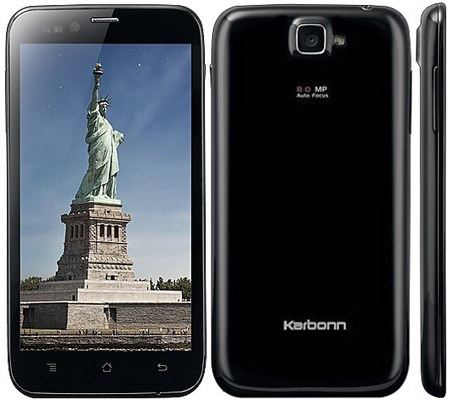
Hello guyz.....we have came back with another topic on how to root the Karbonn Titanium S5....
Follow these steps-
Option 2:
Download this file here
1.Copy the downloaded image file to the folder in your PC where you have set up ADB and fastboot.
2.Rename the file to recovery.img
3.Turn off your phone. Enter fastboot mode by holding the Power and Volume + button for some time.
4.Release both buttons when you see a green screen on your phone.
5.Plug in the phone to PC using USB cable, wait for the drivers to install and finish setting up.
6.If you are in Windows XP, open command prompt and browse to the folder where you have setup ADB. Or if you are in Windows7/8, hold shift then right click in the ADB folder and click to open command prompt there.
7.Type this in the command prompt :
8.This should display your device name in fastboot mode, if nothing is shown, then you have to check previous steps again.
9.Type this command to flash CWM recovery to your phone :
10.It will show the progress and completion dialogue within seconds when it finishes successfully.
#make sure your device is shown in command prompt
2.copy the boot.img to the fastboot folder
#3.lash the boot sector with the boot image
NOTE-remember the last part of the code may be modiffied according to the boot image name
1. Shut down your phone.
2. Press power button+ volume + button simultaneously for sometime.
3. It will flash some green screen...leave those buttons now.
4. Soon you will be in red screen.
5. after getting into red screen, press home button.
6. You are in clockworkmod recovery.
Follow these steps-

1.Download Framaroot here.
2.Copy it to your SD card
3.Open The file and select “GANDALF Exploit“
4.Now This take few minutes to root your device.How to install CWM in Karbonn titanium S5-
Option 1:1. Download Clockworkmod recovery in Karbonn Titanium S5 and place in SD card.2. Rename it to anything you can remember easily for eg. "recovery". (make sure to add ".img", so it will be "recovery.img".3. Now, install Terminal emulator and install in Karbonn Titanium S5.4. Open it and type "su" and hit enter.5. Now type "dd if=/sdcard/recovery.img of=/dev/block/mmcblk0p13" (note: if you renamed that .img to anything then change the line, "/sdcard/YOUR_RECOVERY_NAME".6. You will see some text flashing on your screen.
7.After process Completion,exit the application.....you have successfully installed CWM on your phone!!Option 2:
Download this file here
1.Copy the downloaded image file to the folder in your PC where you have set up ADB and fastboot.
2.Rename the file to recovery.img
3.Turn off your phone. Enter fastboot mode by holding the Power and Volume + button for some time.
4.Release both buttons when you see a green screen on your phone.
5.Plug in the phone to PC using USB cable, wait for the drivers to install and finish setting up.
6.If you are in Windows XP, open command prompt and browse to the folder where you have setup ADB. Or if you are in Windows7/8, hold shift then right click in the ADB folder and click to open command prompt there.
7.Type this in the command prompt :
Code:
fastboot devices
9.Type this command to flash CWM recovery to your phone :
Code:
fastboot flash recovery recovery.img
FLASHING STOCK BOOT
1.Go to fastboot mode as explained above.#make sure your device is shown in command prompt
Code:
fastboot devices
#3.lash the boot sector with the boot image
Code:
fastboot flash boot boot.img
Code:
fastboot flash boot stockboot.img
Now, to enter in the Clockworkmod recovery-
1. Shut down your phone.
2. Press power button+ volume + button simultaneously for sometime.
3. It will flash some green screen...leave those buttons now.
4. Soon you will be in red screen.
5. after getting into red screen, press home button.
6. You are in clockworkmod recovery.
NOTE-WE ARE NOT RESPONSIBLE FOR DAMAGE CAUSED TO YOUR PHONE.
Make sure the following things-
1. Make sure your mobile should has 70% to 80% battery
2. Enable USB debugging mode Settings > Manage Applications > Development > USB Debugging – check box)
3. Backup your important data
4. Install Samsung Galaxy S Duos S7562 drivers or Samsung KIES (drivers are already included )
Follow these steps-
1.Download and extract Samsung Galaxy S duos rooting kit on your computer.
2.Switch Off your phone, take out the battery and insert it back. Now turn on your phone into Download Mode by pressing and holding the Volume Down + Home button together, and then press the Power button till you see the Android logo. Once again press Power button to confirm.
3. Open “Odin.exe” (from extracted folder) and connect your phone via USB cable with your computer in download mode. If your phone is connected successfully the one of the ID:COM boxes will turn yellow.
4.Click on “PDA” button and select file “recovery.tar” (from extracted folder).
5.Please make sure that only F. Reset Time and Auto Reboot options are checked on Odin.

6.Now, click on the Start button on Odin to start the installation process. Installation will take a few minutes to complete so please wait for the complete process.
7.Finally, when the installation process is completed successfully you will see the “PASS” message on Odin and then your device will reboot automatically. When the phone boots up (vibrates) then immediately remove the battery and after 1-2 minutes start your phone. (MAIN STEP)
Your Samsung Galaxy S duos S7562 now has been rooted and you can check the Super app installed on your device. In case, if you want to verify then download Root Checker and verify it by yourself only.
Flashing Clockworkmod-
8.Now, placed the “CWM Recovery file” in the SD card.
9.Switch off your phone to boot into recover mode by press and holding Volume Up + Home button together, and then press the Power button.
10.From the recovery menu, select “Install zip from sdcard” and go to path where you have 11.When the installation process is completed select “++++Go Back++++” and then choose “reboot system” to reboot your phone.
NOTE-WE ARE NOT RESPONSIBLE FOR DAMAGE CAUSED TO YOUR PHONE.
Source-iDroidSpace
Popular Posts
-
Sony has released it's open source package for it's Xperia Z2 and Xperia Z2 Tablet for software version 17.1.A.1.2 which is availab...
-
Launcher Pro provides up to seven home screens, 2D and 3D app drawers with fly-in-effects, a scrollable shortcut dock an...
-
Have you ever wished that your device could sleep and wake with intelligence? You’re not alone. After all, that’s why many recent devices ...
-
HTC M8 , specs upgraded to the HTC One is a high-end smartphone and promising one too.Often compared with Samsung's Galaxy S5. XDA me...
-
 Downloads: Download ClockworkMod image SP Flash Tools Download Drivers (I...
